Problem, Solution, and Results
Problem: I need to collect coordinates from a point cloud made in SolidWorks, but there was no way to save a .csv from the SolidWorks workspace.
Solution: Write a script (SolidWorks Macro) that saves the coordinates of sketch points from SolidWorks workspace to a .csv file and download it onto my computer.
Results: I can now successfully convert the coordinate information associated with sketch points in my SolidWorks workspace to a .csv file.
TLDR Video
Problem
Turn the following:
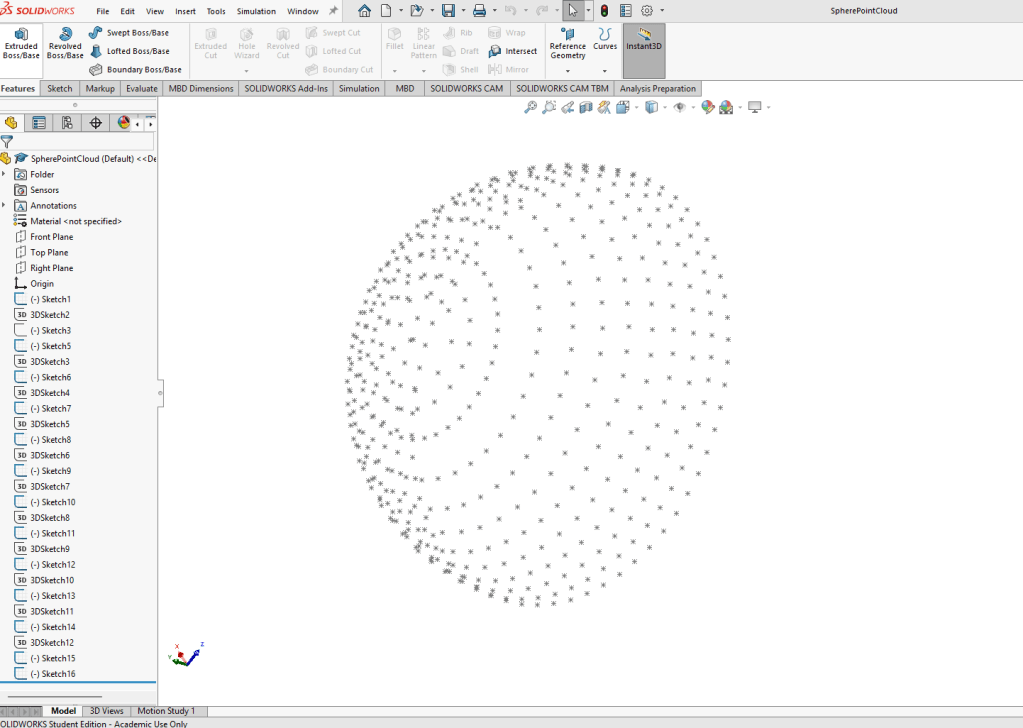
into
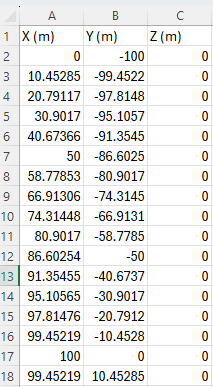
Solution
I can use the Macro functionality to write a script in SolidWorks that can save the coordinate information for me, however, I don’t really know how to program a SolidWorks macro. So, I asked AI.
Asking AI is never perfect the first time around, however, after about 10 or 15 minutes of persistence I got a working script!
'----------------------------------------------
' Macro: ExportSketchPointsToCSV_3DCoords_Final.swp
' Purpose: Export true 3D coordinates of all sketch points to CSV,
'          with Y and Z columns swapped for correct orientation.
'----------------------------------------------

Option Explicit

Dim swAppObj As SldWorks.SldWorks
Dim swModel As SldWorks.ModelDoc2
Dim swFeat As SldWorks.Feature
Dim swSketch As SldWorks.Sketch
Dim swSketchPoint As SldWorks.SketchPoint
Dim swMathUtil As SldWorks.MathUtility
Dim swTransform As SldWorks.MathTransform
Dim swPoint As SldWorks.MathPoint
Dim vSketchPoints As Variant
Dim vCoord As Variant
Dim fileNum As Integer
Dim filePath As String
Dim i As Long

Sub main()

    Set swAppObj = Application.SldWorks
    Set swModel = swAppObj.ActiveDoc

    If swModel Is Nothing Then
        MsgBox "No active document found.", vbExclamation, "Export Sketch Points"
        Exit Sub
    End If

    ' Ask user for output path
    filePath = InputBox("Enter full path and filename for the CSV export:" & vbCrLf & _
                        "(e.g. C:\Users\Public\SketchPoints.csv)", _
                        "Export Sketch Points", "C:\Users\Public\SketchPoints.csv")
    If filePath = "" Then Exit Sub

    ' Ensure .csv extension
    If Right$(LCase(filePath), 4) <> ".csv" Then
        filePath = filePath & ".csv"
    End If

    ' Prepare for math operations
    Set swMathUtil = swAppObj.GetMathUtility

    ' Open file for writing
    fileNum = FreeFile
    Open filePath For Output As #fileNum
    Print #fileNum, "X (m),Z (m),Y (m)"   ' <-- swapped Y and Z column headers

    ' Loop through all sketches
    Set swFeat = swModel.FirstFeature
    Do While Not swFeat Is Nothing

        If swFeat.GetTypeName2 = "ProfileFeature" Or _
           swFeat.GetTypeName2 = "Sketch" Then

            Set swSketch = swFeat.GetSpecificFeature2
            If Not swSketch Is Nothing Then
                vSketchPoints = swSketch.GetSketchPoints2
                If Not IsEmpty(vSketchPoints) Then

                    ' Correct: use inverse transform to go from sketch ? model
                    Set swTransform = swSketch.ModelToSketchTransform
                    If Not swTransform Is Nothing Then
                        Set swTransform = swTransform.Inverse
                    End If

                    For i = 0 To UBound(vSketchPoints)
                        Set swSketchPoint = vSketchPoints(i)

                        Dim arr(2) As Double
                        arr(0) = swSketchPoint.X
                        arr(1) = swSketchPoint.Y
                        arr(2) = swSketchPoint.Z

                        Set swPoint = swMathUtil.CreatePoint(arr)
                        If Not swTransform Is Nothing Then
                            Set swPoint = swPoint.MultiplyTransform(swTransform)
                        End If
                        vCoord = swPoint.ArrayData

                        ' Write global coordinates with Y and Z swapped
                        Print #fileNum, _
                            Format(vCoord(0) * 1000, "0.######") & "," & _
                            Format(vCoord(2) * 1000, "0.######") & "," & _
                            Format(vCoord(1) * 1000, "0.######")
                    Next i
                End If
            End If
        End If

        Set swFeat = swFeat.GetNextFeature
    Loop

    Close #fileNum
    MsgBox "Sketch point coordinates (3D) exported successfully to:" & vbCrLf & filePath, vbInformation

End Sub
Discussion
Obviously the programming in this project is not too intensive or anything, but with this basic macro script editor that doesn’t provide me much information on errors I am making in my programming it would have been challenging, especially given that I am not an extremely skilled programmer.
I’m sure I would figure it out eventually, but with generative AI it was much quicker, really it only took me about 10-15 minutes.
So, this is an example of where using generative AI was a major productivity boost.
 Portfolio of Harrison Tracy